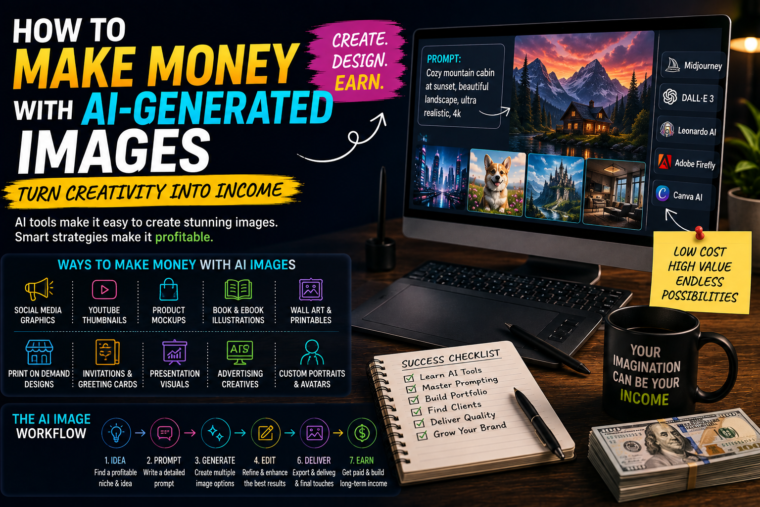
AI has made it possible to create professional-looking images in minutes. But the real opportunity isn’t simply generating pretty pictures-it’s learning how to turn those images into something people and businesses are willing to pay for.
There was a time when creating professional graphics meant learning complicated design software, buying expensive equipment, or hiring a designer.
Today, things are different.
You can describe an image in plain English and have an AI image generator produce something remarkably detailed in a matter of seconds.
Want a futuristic city?
You can create it.
Need a product mockup?
You can generate one.
Want illustrations for a children’s story?
AI can help.
Need social media graphics for a small business?
You can create them.
But here’s the part that matters if you’re interested in making money:
Nobody pays you simply because you can generate an image.
They pay because the image solves a problem.
That’s the difference between someone who occasionally plays around with AI image generators and someone who builds an actual income stream around them.
In this guide, we’ll look at practical ways you can make money with AI-generated images, how to find customers, what you can sell, how to price your work, mistakes to avoid, and how to turn a simple AI skill into a potentially sustainable business.
Can You Really Make Money With AI-Generated Images?
Yes-but probably not in the way some social media posts make it sound.
You may have seen claims like:
“I made £10,000 this month selling AI art!”
That might be true for some people, but it doesn’t mean generating random images will automatically make you money.
The market is becoming more competitive.
AI image generation is increasingly accessible.
That means the valuable skill isn’t simply knowing which button to press.
The valuable skills are:
- Understanding what customers want
- Creating images for a specific purpose
- Developing a recognisable style
- Writing effective prompts
- Editing and improving AI outputs
- Understanding design
- Marketing your services
- Finding customers
- Delivering work reliably
In other words:
AI is the tool.
The business is the skill of using that tool to create value.
What Can You Sell With AI-Generated Images?
There are more possibilities than you might think.
You could create:
- Social media graphics
- YouTube thumbnails
- Blog illustrations
- Product mockups
- Book illustrations
- Posters
- Digital art
- Wall art
- Greeting cards
- Invitations
- Website graphics
- Advertising creatives
- Character concepts
- Children’s illustrations
- Presentation visuals
- Brand concepts
- Background images
- Printable products
- Digital wallpapers
- Marketing materials
You don’t need to sell everything.
In fact, starting with one category is usually smarter.
1. Create Social Media Graphics for Businesses
This is one of the most straightforward opportunities.
Businesses constantly need visual content.
Think about:
- Restaurants
- Cafés
- Gyms
- Hair salons
- Barbers
- Clothing brands
- Coaches
- Estate agents
- Online shops
- Personal trainers
- Local services
They need images for:
- TikTok
- Websites
- Advertisements
- Promotions
You can use AI to speed up the creation process.
For example, a restaurant might need a promotional graphic for a new menu.
Instead of starting from scratch, you can use AI to create a visual concept and then finish the design using your preferred design software.
The important thing is that you’re not selling “an AI image.”
You’re selling:
A professional promotional graphic that helps the business market its product.
That’s a much stronger offer.
2. Make YouTube Thumbnails
YouTube creators need thumbnails constantly.
And thumbnails can have a huge impact on whether someone decides to click a video.
You could offer creators a thumbnail design service.
For example:
Basic package
5 thumbnails per month.
Creator package
15 thumbnails per month.
Premium package
30 thumbnails + title suggestions + multiple thumbnail concepts.
AI can help you generate backgrounds, characters, objects and visual concepts.
You then combine those elements into a finished thumbnail.
Don’t Rely Entirely on AI for Thumbnails
This is important.
AI can generate a beautiful image that makes a terrible thumbnail.
A good thumbnail needs:
- Clear composition
- Strong contrast
- A recognisable subject
- Minimal clutter
- Readable text
- A compelling visual idea
You need to understand what makes someone want to click.
That’s design and marketing-not just image generation.
3. Create Images for Blogs
Bloggers and websites need original visuals.
Instead of using the same generic stock image everyone else is using, they can commission custom illustrations.
Imagine a technology blog publishing an article about artificial intelligence.
You could create a custom hero image showing:
- A futuristic workspace
- An AI assistant
- A laptop
- Data visualisation
- A human interacting with technology
The image is designed specifically for that article.
You could sell this as a service:
“Custom AI-assisted blog graphics for websites and publishers.”
4. Create Book Illustrations
Authors are another potential customer group.
Self-publishing has made it easier for independent authors to publish books, but they still need visual assets.
You could help create:
- Children’s book illustrations
- Character concepts
- Chapter illustrations
- Cover concepts
- Interior artwork
However, consistency becomes extremely important.
If the main character looks completely different on every page, the book will look amateurish.
So you’ll need a workflow for maintaining:
- Character appearance
- Clothing
- Environment
- Colour palette
- Art style
- Perspective
This is one area where simply generating random images isn’t enough.
5. Create Children’s Story Illustrations
Children’s books can be particularly visual.
Imagine an author writes a story about a little fox exploring a magical forest.
You could create a series of illustrations showing:
- The fox waking up
- The fox entering the forest
- Meeting another character
- Discovering a hidden castle
- Returning home
The challenge is consistency.
You want readers to recognise the same fox throughout the story.
That requires careful prompting, reference images, editing and quality control.
6. Sell Digital Wall Art
Another popular business model is selling digital artwork.
You could create artwork around themes such as:
- Abstract art
- Minimalist designs
- Nature
- Fantasy
- Space
- Architecture
- Inspirational quotes
- Animals
- Children’s rooms
- Seasonal decorations
Customers can purchase digital files and print them themselves.
This can be attractive because you don’t necessarily need to handle physical inventory.
But competition can be intense.
Simply uploading hundreds of random AI images isn’t a strategy.
7. Create Printable Products
You can also turn AI-generated artwork into printable products.
For example:
- Posters
- Wall decorations
- Party decorations
- Planner pages
- Colouring pages
- Activity sheets
- Educational resources
- Greeting cards
- Invitations
The key is creating something useful.
A random picture of a cat might be pretty.
A beautifully designed printable children’s activity pack is a product.
8. Create Custom Portraits
People love personalised products.
You could offer custom artwork based on customer-provided photographs, where appropriate and with permission.
Potential products include:
- Cartoon-style portraits
- Fantasy portraits
- Family illustrations
- Pet portraits
- Wedding illustrations
- Character portraits
For example:
“Turn your pet into a fantasy character.”
That’s much easier to market than:
“I sell AI images.”
You’re selling an experience.
Pet Portraits Could Be a Great Niche
Pet owners are often emotionally attached to their animals.
You could create artwork such as:
- A dog as a king
- A cat as an astronaut
- A pet in a fantasy castle
- A pet as a superhero
- A pet in a vintage painting
The possibilities are almost endless.
The value comes from the personal connection.
9. Create Product Mockups
This is a particularly interesting opportunity for small businesses.
Imagine someone sells:
- T-shirts
- Candles
- Coffee
- Cosmetics
- Jewellery
- Artwork
- Notebooks
They need attractive images to promote those products.
You could help them create lifestyle-style product visuals.
For example:
A candle brand could need an image showing its candle on a beautiful bathroom counter.
A clothing company could need a model wearing a particular design.
A coffee brand could need its packaging displayed on a stylish kitchen table.
AI can help create the scene.
You then need to make sure the actual product looks accurate.
Be Careful With Product Accuracy
AI image generators can struggle with:
- Logos
- Packaging text
- Exact product shapes
- Fine details
- Hands
- Small lettering
Don’t simply assume the generated image is ready to publish.
Review everything.
If necessary, use editing software to replace or correct the product itself.
10. Create Advertising Images
Businesses need advertising creatives for:
- Social media
- Websites
- Email campaigns
- Promotional campaigns
You could offer packages such as:
10 advertising image concepts per month
AI can help you generate multiple visual directions quickly.
Then you select the strongest concepts and refine them.
Test Multiple Creative Concepts
One advantage of AI is speed.
Instead of creating one advertising concept, you could create five variations.
For example:
Version A
Product-focused.
Version B
Lifestyle-focused.
Version C
Problem/solution.
Version D
Emotional.
Version E
Minimalist.
The business can test different approaches.
That’s more valuable than delivering one image and hoping it works.
11. Create Website Images
Websites need visuals everywhere.
You could create:
- Hero images
- Backgrounds
- Section illustrations
- Feature graphics
- Icons
- Decorative images
- Product scenes
For a small business that doesn’t have professional photography, AI-assisted visuals can help fill the gap.
Again, the goal isn’t simply to create something pretty.
The image needs to fit the website’s:
- Brand
- Colour palette
- Audience
- Message
- Layout
12. Create Presentation Graphics
Businesses often need visuals for:
- Pitch decks
- Training presentations
- Workshops
- Sales presentations
- Online courses
Instead of using generic stock photography, you could create custom visuals.
For example, a business presentation about productivity could use a custom illustration showing a person moving through an automated workflow.
This can make presentations more engaging.
13. Sell AI-Assisted Design Services
You don’t necessarily have to market yourself as an “AI artist.”
You can simply be a designer who uses AI as part of the process.
That’s often a better positioning.
Compare:
“I make AI images.”
with:
“I create custom marketing graphics for small businesses.”
The second statement focuses on the customer’s problem.
That’s what you want.
14. Create Social Media Content Packages
You can combine images with other services.
For example:
Monthly Content Package
- 12 social media graphics
- 12 captions
- 4 promotional designs
- Content calendar
AI can help with:
- Brainstorming
- Captions
- Visual concepts
- Variations
You handle:
- Branding
- Editing
- Quality control
- Strategy
Now you’re not selling individual images.
You’re selling a complete content service.
15. Create AI Art for Influencers
Creators constantly need visuals.
They might want:
- YouTube thumbnails
- Instagram graphics
- Podcast artwork
- Backgrounds
- Promotional images
- Merchandise concepts
If you specialise in a particular creator niche, you can develop a repeatable workflow.
For example:
“I create YouTube thumbnails and promotional artwork for gaming creators.”
That’s much easier to sell than a vague AI art service.
16. Create Artwork for Podcasters
Podcasters need:
- Episode artwork
- Social media graphics
- Quote cards
- Promotional images
- YouTube thumbnails
You could offer a monthly package.
For every episode, you create:
- One main graphic
- Three quote graphics
- One YouTube thumbnail
- Several social media assets
One podcast episode becomes multiple products for you.
17. Create Merchandise Designs
AI-generated artwork can potentially be used as the basis for designs for:
- T-shirts
- Hoodies
- Posters
- Stickers
- Phone cases
- Mugs
- Tote bags
You could work with print-on-demand businesses so you don’t have to hold inventory yourself.
However, you need to understand the commercial-use terms of the AI tools you’re using and the marketplace you’re selling through.
More on that later.
18. Create Custom Invitations
People need invitations for:
- Birthdays
- Weddings
- Baby showers
- Graduation parties
- Anniversaries
- Corporate events
AI can help create unique visual themes.
For example:
A luxury black-and-gold birthday invitation.
Or:
A whimsical woodland children’s party invitation.
You can combine the AI artwork with typography and layout to create a finished invitation.
19. Create Greeting Cards
Greeting cards are another potential application.
You could create designs for:
- Birthdays
- Weddings
- Christmas
- Valentine’s Day
- Mother’s Day
- Father’s Day
- Thank-you cards
- Congratulations
Again, the key is differentiation.
Don’t create generic images.
Create designs for specific audiences.
20. Create Educational Visuals
Teachers, tutors and educational creators often need visuals.
You could create:
- Flashcards
- Illustrations
- Worksheets
- Diagrams
- Story scenes
- Educational posters
For example, a teacher might need illustrations explaining the solar system to young children.
You could create a consistent visual set.
The Most Important Question: Who Is Going to Pay?
This is where many people go wrong.
They ask:
“What AI images can I make?”
Instead, ask:
“Who has a problem that these images can solve?”
That’s a completely different question.
Potential customers include:
- Small businesses
- Authors
- YouTubers
- Bloggers
- Influencers
- Podcasters
- Online stores
- Teachers
- Coaches
- Event organisers
- Marketing agencies
- Publishers
- Creators
Choose one.
Pick a Niche Instead of Selling to Everyone
You might think:
“I’ll make AI images for anyone.”
That’s technically possible.
But it’s difficult to market.
Compare:
“I make AI-generated images.”
with:
“I create social media graphics for local restaurants.”
The second is clearer.
Or:
“I create custom YouTube thumbnails for gaming creators.”
Now you know exactly who you’re targeting.
How to Find Your First Customer
You don’t need a huge audience.
Start locally or online.
Look for businesses and creators who already need visual content.
Check their:
- Website
- YouTube
- TikTok
- Online store
Look for obvious gaps.
Maybe their images are inconsistent.
Maybe they don’t have enough content.
Maybe their thumbnails are weak.
Maybe their website looks outdated.
That’s your opening.
Create a Sample Before You Sell
This is one of the easiest ways to demonstrate your ability.
Suppose you want to work with restaurants.
Find a restaurant with an active social media presence.
Create a sample promotional graphic based on their existing brand.
Then show them:
“Here’s an example of how your new menu could be promoted visually.”
You’re not just saying:
“I’m good at AI.”
You’re showing them what they could receive.
Don’t Do an Entire Month for Free
One sample is enough.
If someone wants 30 images for free, that’s not a client.
That’s someone looking for free work.
Your sample should demonstrate quality without giving away your entire service.
Build a Portfolio
Your portfolio doesn’t need to be complicated.
You could start with 10–15 strong examples.
Organise them into categories:
Social media
Show several posts.
Thumbnails
Show several YouTube examples.
Product visuals
Show product mockups.
Illustrations
Show different styles.
Don’t fill your portfolio with every image you’ve ever generated.
Quality beats quantity.
Make Your Portfolio Look Like a Business
A portfolio full of random AI experiments can make you look like someone playing with a tool.
A focused portfolio makes you look like a professional.
Instead of:
- Random dragon
- Random astronaut
- Random landscape
- Random portrait
show:
Restaurant Campaign
YouTube Thumbnail Package
Skincare Product Campaign
Children’s Book Illustration
You’re demonstrating solutions.
How to Price AI-Generated Images
There isn’t one universal price.
Your pricing can depend on:
- Complexity
- Number of images
- Editing
- Revisions
- Commercial usage
- Client type
- Turnaround time
- Your experience
- Whether you’re providing strategy
You might charge per image.
Or you might use packages.
Example Pricing Structure
You could create something like:
Starter
5 custom graphics.
Business
15 custom graphics.
Premium
30 graphics + revisions + different formats.
The actual price should reflect the value and work involved.
Don’t assume that because AI generates an image quickly, your service should be extremely cheap.
Charge for the Finished Result
Imagine a client asks for a promotional image.
You generate the first version in 30 seconds.
But then you:
- Review it
- Fix mistakes
- Adjust the composition
- Add branding
- Edit the text
- Create alternative versions
- Export different sizes
- Communicate with the client
That entire process is what you’re selling.
Not the 30 seconds.
Offer Packages Instead of Individual Images
Packages can make your business easier to sell.
For example:
Monthly Social Media Graphics Package
12 branded graphics
12 captions
3 promotional designs
Two revision rounds
Now the customer understands exactly what they’re receiving.
Recurring Clients Are Extremely Valuable
Imagine you find a business that needs graphics every month.
Instead of constantly searching for new customers, you can build a relationship with that business.
For example:
Client A: Monthly graphics
Client B: YouTube thumbnails
Client C: Product images
Client D: Social media content
Now you have recurring work.
That is much more sustainable than hoping someone randomly buys one image.
AI Doesn’t Mean You Should Stop Learning Design
If anything, design knowledge becomes more valuable.
Learn the basics of:
- Composition
- Typography
- Colour
- Contrast
- Spacing
- Hierarchy
- Branding
- Visual storytelling
AI can generate a beautiful image.
But it doesn’t automatically know what looks good in the context of a customer’s brand.
Your judgement is the valuable part.
Learn Basic Photo Editing
Even if AI creates most of the image, you may need to edit it.
Learn how to:
- Remove backgrounds
- Correct colours
- Add text
- Resize images
- Fix imperfections
- Combine elements
- Adjust lighting
- Create transparent assets
This can dramatically improve the quality of your work.
Don’t Depend on One AI Tool
AI tools change quickly.
A tool that is amazing today might be replaced by something better tomorrow.
Instead of becoming obsessed with one platform, learn the underlying process:
Idea → Prompt → Generate → Select → Edit → Design → Deliver
The tools can change.
Your workflow remains.
Learn Prompting—but Don’t Obsess Over It
Prompting can help you communicate your ideas more precisely.
A useful prompt might specify:
- Subject
- Setting
- Composition
- Lighting
- Mood
- Camera perspective
- Colour palette
- Style
- Aspect ratio
For example, instead of:
“A coffee shop.”
you could describe:
“A cosy independent coffee shop on a rainy London morning, warm interior lighting, wooden tables, steaming coffee, cinematic photography, realistic textures, editorial advertising style.”
The second gives the generator far more direction.
But Prompting Isn’t Magic
A long prompt doesn’t automatically create a better image.
Sometimes a simple prompt produces exactly what you need.
The skill is learning how to communicate the visual outcome you’re trying to achieve.
Generate Multiple Versions
Don’t settle for the first image.
Create variations.
Change:
- Composition
- Camera angle
- Lighting
- Background
- Colour
- Subject position
Then select the strongest result.
This is one of the biggest advantages of AI.
You can explore many concepts quickly.
AI Images Still Need Quality Control
Before delivering anything, inspect:
- Hands
- Faces
- Eyes
- Text
- Logos
- Product details
- Background objects
- Shadows
- Reflections
- Perspective
AI-generated mistakes can be surprisingly subtle.
Don’t assume the image is perfect because it looks impressive at first glance.
The Legal Side Matters
This is one part of AI image creation you shouldn’t ignore.
Different AI platforms have different terms regarding:
- Commercial use
- Ownership
- Licensing
- Training data
- Generated content
- Account plans
And laws concerning copyright and AI-generated material can vary by jurisdiction and continue to evolve.
So before selling an image commercially, check the current terms of the specific AI tool you’re using and the rules of the marketplace or platform where you’re selling it.
Don’t assume:
“I generated it, therefore I automatically own every possible right to it.”
That’s an oversimplification.
Be Careful With Famous Characters and Brands
Generating an image of a recognisable copyrighted character and selling merchandise featuring it can create legal problems.
The same applies to:
- Logos
- Trademarks
- Celebrity likenesses
- Sports team branding
- Corporate identities
A safer approach is creating original concepts.
Instead of:
“A famous superhero.”
create:
“An original futuristic superhero character wearing a blue-and-silver technological suit.”
Originality gives you much more room to build a business.
Don’t Copy Another Artist’s Style Too Closely
This is another area where you should exercise judgement.
If your entire business depends on replicating a living artist’s distinctive style, you’re entering uncomfortable territory.
A better approach is to develop your own visual direction.
Think in terms of:
- Mood
- Medium
- Composition
- Colour
- Era
- Subject matter
Rather than trying to become a digital clone of another artist.
Create Your Own Visual Identity
If you’re selling AI artwork, having a recognisable style can help.
Maybe your work consistently uses:
- Warm colours
- Cinematic lighting
- Minimalist compositions
- Surreal environments
- Retro-futuristic themes
Over time, people may begin recognising your work.
That’s valuable.
Don’t Chase Every Trend
AI image trends appear constantly.
One week everyone is making:
- Action figures
- Cartoon portraits
- Fantasy avatars
The next week it’s something completely different.
Trends can be useful.
But building an entire business around temporary trends can be risky.
Build skills that survive trends.
A Better Business Model: AI + Human Creativity
The strongest approach is usually not:
AI alone
but:
AI + design + editing + marketing + human creativity
For example:
AI generates 50 concepts.
You select the best five.
You edit them.
You apply branding.
You create multiple sizes.
You write the accompanying copy.
You deliver a polished campaign.
Now the client receives something genuinely useful.
Think Like a Problem Solver
Suppose a client says:
“We need more Instagram content.”
Don’t respond with:
“I can generate AI images.”
Ask:
- What are you promoting?
- Who is your audience?
- What type of content performs best?
- What products need attention?
- What promotions are coming up?
- What does your brand look like?
- What assets do you already have?
Then create a solution.
That’s how you become valuable.
Create an AI Image Production System
Once you have clients, don’t reinvent the process every time.
Build a system.
Step 1
Collect client information.
Step 2
Understand their brand.
Step 3
Create visual references.
Step 4
Generate concepts.
Step 5
Select the strongest outputs.
Step 6
Edit and refine.
Step 7
Add branding.
Step 8
Create different sizes.
Step 9
Quality check.
Step 10
Deliver.
A repeatable system makes your business much easier to scale.
Keep a Prompt Library
If you discover prompts that consistently produce useful results, save them.
Organise them by category:
- Product photography
- Social media
- Portraits
- Landscapes
- Backgrounds
- Thumbnails
- Advertising
- Illustrations
Over time, your prompt library becomes a valuable productivity asset.
Create Templates
You can also create reusable templates for:
- Instagram posts
- YouTube thumbnails
- Advertisements
- Product images
- Blog banners
- Invitations
Now you don’t have to start from zero every time.
Use AI to Generate Ideas, Not Just Images
This is an underrated strategy.
AI can help you think about:
- Campaign concepts
- Product launches
- Seasonal promotions
- Social media themes
- Visual storytelling
- Advertising angles
For example:
“Give me 20 visual campaign concepts for a small coffee brand launching a new winter drink.”
Now you’re using AI as a creative partner rather than simply an image generator.
How to Market Your AI Image Business
You need people to know you exist.
You could market through:
- Social media
- Freelance platforms
- Direct outreach
- Your own website
- Online communities
- Networking
- Referrals
- Content marketing
Don’t rely on one method.
Use Your Own Social Media as a Portfolio
Post your work.
Show:
Before → After
Prompt → Final image
Concept → Finished design
Old thumbnail → New thumbnail
This demonstrates your process.
It also gives potential customers a reason to follow you.
Show the Business Result
Instead of posting:
“Here’s an AI image I made.”
post:
“Here’s how I turned a basic product photo into three advertising concepts for a fictional skincare brand.”
Now you’re showing a skill.
Make Content About Your Process
People are naturally curious about how AI images are created.
You could post:
- Prompting tips
- Before-and-after comparisons
- Image breakdowns
- Tutorials
- Mistakes
- Experiments
- Tool comparisons
Your content can attract potential customers while demonstrating your expertise.
Don’t Wait for Customers to Find You
Outbound marketing can work too.
Find businesses that could benefit from your service.
Then contact them.
But don’t spam.
Write personalised messages.
Mention something specific about their business.
Show a sample where appropriate.
Example Outreach Message
You could say something like:
Hi, I came across your Instagram and noticed you’re promoting your new products with mostly the same type of imagery. I created a quick sample showing how you could use more lifestyle-focused visuals. If you’d like, I can send it over.
Short.
Specific.
No giant sales pitch.
What If Nobody Responds?
Don’t immediately assume the business doesn’t work.
Your:
- Offer
- Portfolio
- Target audience
- Message
- Pricing
might need improvement.
Treat outreach as an experiment.
Try different approaches.
How to Scale Your Business
Once you have a reliable workflow, you can start increasing capacity.
You could:
- Raise prices
- Offer larger packages
- Add editing services
- Add social media services
- Hire designers
- Work with agencies
- Sell templates
- Sell digital products
- Create courses
- Build an audience
Eventually, you could move from selling individual images to selling a complete creative service.
You Could Work With Marketing Agencies
Agencies often need lots of creative assets.
Instead of finding individual small businesses, you could become a creative supplier for an agency.
For example, an agency might need:
- 20 ad concepts
- 30 social graphics
- 10 product images
- 15 variations
every month.
That can create a much larger recurring relationship.
You Could Create an AI Creative Agency
At a larger scale, you could build an agency that offers:
- AI-assisted image generation
- Social media graphics
- Video content
- Advertising creatives
- Product photography concepts
- Thumbnails
- Branding visuals
AI becomes part of your production system.
Your agency becomes the product.
You Could Sell Digital Products
Another way to make money is creating products once and selling them repeatedly.
For example:
- Prompt packs
- Design templates
- Printable artwork
- Digital wallpapers
- Stock-style image collections
- Social media templates
- Thumbnail templates
- Creative guides
This can potentially create more scalable income than selling individual hours.
But Digital Products Aren’t “Passive” at First
People love the phrase:
“Passive income.”
The reality is usually less glamorous.
You still need to:
- Create the product
- Design the sales page
- Market it
- Answer questions
- Update it
- Improve it
The advantage is that you don’t necessarily need to recreate the entire product for every customer.
Build a Collection Instead of One Product
Suppose you create digital wall art.
Don’t make one image and stop.
Build a collection.
For example:
Minimalist Travel Collection
20 prints.
Or:
Cosmic Nursery Collection
15 prints.
A collection can feel much more valuable than a single random image.
Combine Products Into Bundles
You can also bundle related products.
For example:
50 AI-generated printable nursery illustrations
instead of selling one at a time.
Bundles can increase the perceived value of your offer.
How to Make Your AI Art Stand Out
The internet is already full of AI-generated images.
So ask yourself:
Why would someone choose mine?
Potential answers include:
- Better design
- Better niche
- Personalisation
- Better storytelling
- Better branding
- Higher quality
- Faster service
- Unique concepts
- Better customer experience
The image itself isn’t always the differentiator.
The entire experience can be.
Personalisation Is Powerful
A generic image can be replaced easily.
A personalised image is harder to replace.
For example:
“Your dog as a medieval king.”
That’s a product someone can emotionally connect with.
You could offer multiple themes:
- Medieval
- Space
- Fantasy
- Royal
- Superhero
- Vintage
- Film noir
Personalisation creates a reason to buy.
Don’t Forget Customer Service
This sounds boring compared with AI.
But it matters.
Respond quickly.
Meet deadlines.
Be clear about revisions.
Ask questions.
Deliver files correctly.
Fix mistakes.
A customer who has a great experience may recommend you to someone else.
A 30-Day Plan to Start Making Money With AI Images
If you wanted to start from scratch, here’s a realistic approach.
Week 1: Learn
Choose one niche.
Learn your AI image tool.
Practise generating and editing images.
Study basic design.
Week 2: Build a Portfolio
Create 10–15 strong examples.
Focus on one type of customer.
For example:
Restaurant graphics
or
YouTube thumbnails
or
Pet portraits
Week 3: Create Your Offer
Decide:
- What you sell
- Who you sell it to
- How much you charge
- How many revisions are included
- How customers receive the files
Keep it simple.
Week 4: Find Customers
Contact potential clients.
Post your work.
Ask for referrals.
Improve your portfolio.
Keep experimenting.
Your first goal isn’t £10,000.
It’s getting one paying customer.
What Your First Client Could Look Like
Imagine you choose YouTube thumbnails.
You find a small creator whose videos are good but whose thumbnails aren’t particularly strong.
You create two sample concepts.
The creator likes them.
You offer:
10 custom thumbnails per month.
They agree.
Now you’ve gone from:
“I want to make money with AI.”
to:
“I have a customer who pays me for a useful service.”
That’s a massive difference.
From One Client to a Business
Once you understand your process, you can gradually grow.
Stage 1
One client.
Stage 2
Three recurring clients.
Stage 3
Five to ten clients.
Stage 4
Raise your prices.
Stage 5
Create systems.
Stage 6
Outsource repetitive tasks.
Stage 7
Build an agency or digital product business.
You don’t have to do everything at once.
The Biggest Mistakes to Avoid
1. Selling Random AI Art
Nobody knows why they should buy it.
Instead: Solve a specific problem.
2. Competing Only on Price
Cheap AI images are everywhere.
Instead: Compete on quality, service and value.
3. Ignoring Editing
The first AI output is rarely the final product.
Instead: Refine it.
4. Ignoring Copyright and Licensing
Don’t assume everything is automatically commercially safe.
Instead: Check the relevant terms and laws.
5. Copying Famous Characters
This can create unnecessary legal problems.
Instead: Develop original concepts.
6. Creating Without a Customer in Mind
You might make beautiful images nobody wants.
Instead: Start with demand.
7. Buying Every AI Tool
You don’t need 20 subscriptions.
Instead: Master a small toolkit.
8. Giving Up Too Quickly
Your first designs may not sell.
Instead: Learn from feedback.
The Best Way to Think About AI Image Generation
Don’t think:
“AI can make pictures.”
Think:
“AI lets me produce visual solutions faster.”
That’s a much more useful mindset.
A restaurant needs advertising.
A YouTuber needs thumbnails.
An author needs illustrations.
A business needs product images.
A blogger needs graphics.
A pet owner wants a personalised portrait.
Those are problems.
AI gives you another way to solve them.
Final Thoughts
Making money with AI-generated images isn’t really about becoming an “AI artist.”
It’s about becoming useful.
The technology has dramatically lowered the barrier to creating visual content.
But that also means more people can do it.
So the easiest way to stand out isn’t to generate more images.
It’s to understand what people actually need.
Find a niche.
Learn its problems.
Create a focused service.
Build a strong portfolio.
Use AI to speed up your workflow.
Edit everything carefully.
Learn basic design.
Understand commercial licensing.
Find your first customer.
Then improve.
Maybe you’ll create social media graphics for local businesses.
Maybe you’ll specialise in YouTube thumbnails.
Maybe you’ll sell personalised pet artwork.
Maybe you’ll create illustrations for authors.
Maybe you’ll build a digital product business.
Maybe you’ll eventually turn the whole thing into a creative agency.
There isn’t one correct path.
The Bottom Line
AI-generated images can become a source of income, but the money isn’t in the pixels.
It’s in what those pixels help someone accomplish.
A good image can:
- Sell a product
- Get a YouTube click
- Make a website look professional
- Bring a brand to life
- Tell a story
- Make someone laugh
- Create an emotional connection
- Help a business stand out
That’s where the value lives.
So don’t ask:
“What AI image can I sell?”
Ask:
“What can I create that someone genuinely needs?”
Once you start thinking that way, AI image generation stops being just a fun technology to experiment with.
It becomes a tool you can use to build a real skill, a real service and potentially a real business.