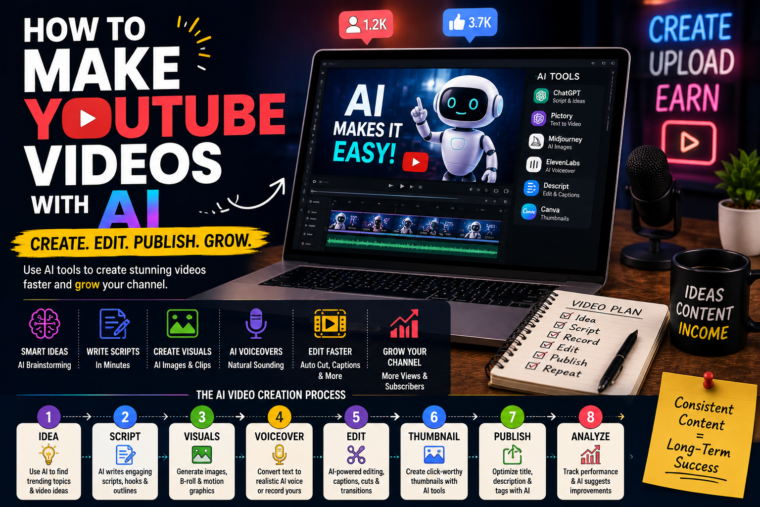
You don’t need a studio, expensive camera or years of video-editing experience to start a YouTube channel. With AI, you can research ideas, write scripts, create visuals, edit videos and even turn one piece of content into multiple videos. Here’s how to do it without making your channel feel robotic.
YouTube can look intimidating from the outside.
You see creators with expensive cameras, studio lighting, professional microphones, perfectly edited videos and thousands-or millions-of subscribers.
It can leave you thinking:
“How am I supposed to compete with that?”
Here’s the good news: you don’t necessarily need all of that to get started.
AI has changed the YouTube production process considerably.
Today, one person can use AI-assisted tools to help with almost every stage of making a video-from coming up with the initial idea to writing a script, creating visuals, editing footage, generating captions and repurposing the finished video.
But there’s something important to understand.
AI doesn’t automatically make good YouTube videos.
It can make the process faster.
It can help you overcome a blank page.
It can handle repetitive tasks.
It can give you ideas when you’re stuck.
But if you simply press a button and upload whatever comes out, your channel will probably feel like thousands of other low-effort AI channels.
The real opportunity is combining AI’s efficiency with human creativity, personality and judgement.
And that’s exactly what this guide is about.
Can You Really Make YouTube Videos With AI?
Absolutely.
AI can help with many parts of the YouTube creation process, including:
- Finding video ideas
- Researching topics
- Writing scripts
- Creating outlines
- Generating titles
- Creating thumbnail concepts
- Generating images
- Creating voiceovers
- Editing videos
- Adding captions
- Removing silence
- Creating short clips
- Writing descriptions
- Repurposing content
- Analysing performance
You don’t have to use AI for every single step.
In fact, you shouldn’t.
Think of AI as a collection of assistants.
You are still the director.
What Does an AI YouTube Video Actually Look Like?
There isn’t one specific type of “AI YouTube video.”
You could create:
Faceless videos
You don’t appear on camera.
Examples include:
- Educational videos
- History
- Technology
- Finance
- Interesting facts
- Tutorials
- Documentaries
- Commentary
AI-assisted talking-head videos
You appear on camera while AI helps with the production.
Screen-recording videos
You record your screen while AI helps with the script and editing.
Animated videos
AI helps create illustrations, scenes or animation.
AI-generated storytelling videos
You combine narration, visuals, music and editing to tell a story.
Tutorial videos
You demonstrate a process while AI helps with planning, scripting and editing.
The best format depends on your interests and your audience.
Why YouTube and AI Work So Well Together
Making a YouTube video traditionally involves a lot of separate tasks.
You need an idea.
Then research.
Then a script.
Then recording.
Then editing.
Then a thumbnail.
Then a title.
Then a description.
Then promotion.
For a beginner, that can feel overwhelming.
AI can reduce some of the friction.
For example:
Idea → AI brainstorming → research → script → recording → AI-assisted editing → thumbnail → upload
Instead of staring at a blank document for two hours, you can start with a rough idea and build from there.
But Don’t Build a Channel Around “AI”
This is one of the biggest lessons I’d recommend remembering.
There’s a difference between:
Using AI to make YouTube videos
and:
Making YouTube videos that have no personality because they were made entirely by AI.
The first can be incredibly useful.
The second can quickly become boring.
Think about your own YouTube habits.
Would you rather watch:
A generic AI voice reading an article over random stock footage
or:
A well-researched video with a strong story, interesting visuals and a creator who clearly knows the subject?
Most people would choose the second.
So don’t use AI as a substitute for having something interesting to say.
Use it to help you say it better.
Step 1: Choose Your YouTube Niche
Before opening an AI tool, decide what your channel is actually about.
A niche is essentially the area your channel focuses on.
Examples include:
- AI
- Technology
- Gaming
- Fitness
- Business
- Personal finance
- History
- Science
- Education
- Travel
- Productivity
- Self-improvement
- Cooking
- Fashion
- Anime
- Movies
- Sports
- Tutorials
You don’t necessarily have to choose an incredibly narrow niche.
But having a clear direction helps.
Choose a Topic You Can Actually Talk About
This sounds obvious, but it’s easy to overlook.
You might see someone making money from AI videos about obscure historical events and think:
“I’ll do that too.”
Then you realise you don’t actually enjoy history.
You spend three weeks researching topics you don’t care about.
Eventually, you stop uploading.
A better approach is to find the overlap between:
What you’re interested in
What people want to watch
What you can realistically create
That’s a much better starting point.
Step 2: Choose Your Video Format
Once you know your niche, decide what your videos will look like.
For example, if you’re running a technology channel, you could make:
Tutorials
“How to Use AI to Automate Your Emails”
Explainers
“How AI Actually Works”
List Videos
“10 AI Tools You Should Try”
Comparisons
“ChatGPT vs Other AI Tools”
News/Commentary
“What This New AI Update Means”
Case Studies
“How a Small Business Used AI to Save Time”
You don’t have to stick to one format forever.
But having a few repeatable formats makes creating videos easier.
Step 3: Find Video Ideas
This is where AI can be incredibly helpful.
Instead of asking:
“Give me YouTube ideas.”
Give it more context.
Tell it:
- Your niche
- Your target audience
- Your experience level
- The type of videos you make
- The goal of the video
Then ask for ideas based on specific problems or questions your audience has.
For example:
“Give me 20 YouTube video ideas for beginners who want to use AI to make money online. Focus on practical problems rather than generic motivational topics.”
You’ll usually get much more useful results.
Don’t Make Every Idea a List Video
AI loves lists.
You’ll often get suggestions like:
- 10 Best AI Tools
- 10 Ways to Make Money
- 15 AI Tips
- 20 Things You Need to Know
There’s nothing wrong with list videos.
But if your entire channel is:
“10 Things…”
“15 Things…”
“20 Things…”
it can become repetitive.
Mix your formats.
Tell stories.
Answer questions.
Run experiments.
Compare things.
Show examples.
Give opinions.
That’s where human creativity matters.
Find the Question Behind the Search
One of the best ways to come up with videos is to think about what people are actually trying to accomplish.
Instead of:
“AI tools”
think:
“How can I use AI to save five hours a week?”
Instead of:
“YouTube editing”
think:
“How can I edit a YouTube video if I’ve never edited before?”
Instead of:
“ChatGPT”
think:
“How can I use ChatGPT to start freelancing?”
The second approach gives you a clearer video.
Step 4: Research Your Topic
Once you have an idea, research it.
This is one area where you shouldn’t blindly trust AI.
AI can produce convincing information that isn’t necessarily accurate.
That’s especially important when creating videos about:
- Finance
- Health
- Science
- Law
- Current events
- Statistics
- Historical claims
Use reliable sources and verify important facts.
Your reputation is attached to the video.
AI Can Help Organise Your Research
AI can be useful for turning messy notes into a structure.
For example, you might have:
- Several articles
- Your own notes
- Interview information
- Statistics
- Examples
AI can help organise these into categories and identify gaps.
But don’t let it invent information to fill those gaps.
If you don’t know something, research it.
Step 5: Write Your YouTube Script
Now comes the fun part.
Your script doesn’t need to sound like an essay.
YouTube is conversational.
Imagine you’re explaining the topic to one person.
A Simple YouTube Script Structure
A useful structure is:
1. Hook
Give viewers a reason to keep watching.
2. Problem
Explain what they’re struggling with.
3. Promise
Tell them what they’re going to learn.
4. Main content
Deliver the useful information.
5. Examples
Show how it works in the real world.
6. Conclusion
Summarise the key lesson.
7. Call to action
Give viewers a natural next step.
Your First 30 Seconds Matter
Imagine someone clicks your video.
They don’t know you.
They don’t owe you their attention.
If the first 30 seconds are:
“Hey guys, welcome back to another video. Today we’re going to be talking about…”
you’ve used valuable time without giving them a reason to stay.
Try starting with the problem.
For example:
“You don’t need a £2,000 camera to start making YouTube videos. In fact, you can create your first video using equipment you may already have-and AI can help with almost everything else.”
Now the viewer knows what they’re going to get.
Don’t Overwrite Your Script
One of the biggest problems with AI-generated scripts is that they can be too long.
AI doesn’t mind writing 5,000 words.
Your viewers might.
If you can explain something clearly in 1,500 words, don’t stretch it to 4,000.
Good YouTube content respects people’s time.
Make Your Script Sound Human
This is incredibly important.
Read the script out loud.
If you wouldn’t actually say the sentence, change it.
For example:
AI-sounding
“In today’s rapidly evolving digital landscape, artificial intelligence is revolutionising the content creation industry.”
More natural
“AI is changing how people make videos-and it’s happening much faster than most of us expected.”
The second sounds like something an actual person might say.
Add Your Own Opinions
AI can give you information.
You can give the video a point of view.
For example:
“Personally, I wouldn’t pay for five different AI subscriptions when you’re just starting.”
That’s an opinion.
It makes the content feel more personal.
Tell Stories
People remember stories.
Instead of simply saying:
“AI can help you edit videos faster.”
Tell a story:
“When I first started editing videos, I’d spend an entire evening cutting out pauses and adding captions. Now, AI can handle a lot of that repetitive work in a fraction of the time.”
Stories create context.
Step 6: Decide Whether You’ll Show Your Face
You don’t have to.
There are advantages to both approaches.
Showing Your Face
Can help with:
- Trust
- Personality
- Personal branding
- Community
- Audience connection
But you need to be comfortable on camera.
Faceless YouTube Channels
Faceless channels can work too.
You could use:
- Narration
- Screen recordings
- Animations
- Illustrations
- Stock footage
- Product demonstrations
- Charts
- Generated visuals
This can be particularly useful for educational or documentary-style channels.
But don’t assume “faceless” means “effortless.”
You still need:
Good ideas + good scripts + good narration + good editing.
Step 7: Record Your Voice
If you’re comfortable using your own voice, I’d strongly consider it.
Your voice adds personality.
You don’t need a perfect radio voice.
You just need to be understandable and engaging.
Speak naturally.
Don’t try to sound like a documentary narrator unless that’s genuinely your style.
What If You Don’t Want to Use Your Voice?
AI voice tools can create narration.
This can be useful for certain types of videos.
However, be careful.
Some AI voices sound unnatural, especially when:
- Sentences are too long
- Punctuation is poor
- The script lacks emotion
- The voice doesn’t match the content
If you’re using AI narration, write specifically for spoken delivery.
Shorter sentences generally work better.
Step 8: Create Your Visuals
Now you need to turn the script into something people can actually watch.
Depending on the type of video, you could use:
- Your own footage
- Screen recordings
- Photos
- Graphics
- Charts
- Animations
- AI-generated images
- Stock footage
- Product demonstrations
- Text overlays
Don’t leave one static image on the screen for five minutes.
Visual variety helps maintain attention.
Use AI to Generate Visual Ideas
AI can help you create a visual plan.
For example:
Script
“AI can help freelancers complete repetitive tasks faster.”
Visual
Show a freelancer working at a computer.
Then:
Script
“Instead of manually organising every piece of information…”
Visual
Show a workflow diagram.
Then:
Script
“You can automate parts of the process.”
Visual
Show the workflow becoming automated.
You’re essentially turning your script into a storyboard.
Step 9: Edit Your Video
This is where your video starts coming together.
Basic editing includes:
- Cutting mistakes
- Removing unnecessary pauses
- Adding music
- Adding captions
- Adding visuals
- Adding transitions
- Adjusting audio
- Zooming or reframing footage
- Adding B-roll
AI-assisted editing can speed up many repetitive tasks.
Don’t Overdo the Editing
A beginner mistake is adding an effect every two seconds.
Zoom.
Whoosh.
Pop-up.
Transition.
Explosion.
Another zoom.
Please don’t.
Editing should support the story.
It shouldn’t distract from it.
Use Captions
Captions can make videos easier to follow, especially on mobile devices.
You can use AI-assisted transcription to generate them quickly.
But always check them.
Automatic captions can misinterpret words, names and technical terms.
Step 10: Create a Great Thumbnail
Your thumbnail is one of the first things potential viewers see.
It needs to communicate the video’s idea quickly.
A strong thumbnail generally has:
- One clear concept
- Large readable text
- Strong visual contrast
- A clear subject
- Minimal clutter
Don’t try to put your entire video into the thumbnail.
Give viewers one reason to click.
Don’t Make the Thumbnail Too Complicated
Imagine someone looking at it on a phone.
Can they understand it immediately?
If the thumbnail has:
- 17 words
- Six tiny images
- Three logos
- A paragraph of text
it’s probably too complicated.
Keep it simple.
Step 11: Write a Strong Title
Your title and thumbnail work together.
A title could be:
How to Make YouTube Videos With AI
That’s straightforward.
You could make it more specific:
How to Make YouTube Videos With AI as a Beginner
Or curiosity-driven:
I Used AI to Make a YouTube Video From Scratch
The best title depends on your video.
Don’t make promises the video doesn’t deliver.
Avoid Clickbait That Lies
There’s a difference between curiosity and deception.
Bad:
AI MADE ME £100,000 OVERNIGHT!!!
when it didn’t.
Better:
I Tested AI for 30 Days to See If It Could Make Money
The second creates curiosity without making a ridiculous claim.
Step 12: Write Your Description
Your description can provide:
- A summary
- Important links
- Resources
- Timestamps
- Additional information
- Calls to action
AI can help you draft descriptions.
Again, review them before publishing.
Step 13: Publish Consistently
You don’t necessarily need to upload every day.
Consistency matters more than exhausting yourself.
You might start with:
One video per week.
That’s 52 opportunities to improve over a year.
If you can comfortably make two videos per week, great.
But don’t create a schedule that causes you to quit after three weeks.
Quality Beats Quantity
I’d rather see someone publish:
One genuinely useful video every week
than:
Seven terrible AI-generated videos every day.
YouTube isn’t just about producing videos.
It’s about producing videos people want to watch.
Use AI to Repurpose Your Videos
This is one of the biggest opportunities.
Imagine you spend several hours creating one 15-minute YouTube video.
Don’t let that content disappear after publishing.
You can turn it into:
- 3 YouTube Shorts
- 5 Instagram Reels
- 5 TikToks
- 10 social media posts
- 1 newsletter
- 1 blog post
- Quote graphics
One idea can become an entire content ecosystem.
Example: One Video Becomes 20 Pieces of Content
Imagine your video is:
“10 Ways AI Can Help Freelancers Save Time.”
From that one video, you could create:
YouTube
1 full-length video.
Shorts
5 short clips.
5 carousel posts.
TikTok
5 short videos.
Text posts
4 posts.
That’s potentially 20 pieces of content from one core idea.
AI can help you identify the strongest moments and adapt them to different formats.
AI Can Help With YouTube Shorts
Shorts can be a useful way to introduce people to your channel.
Take one interesting idea from your longer video.
Turn it into:
Hook → Value → Payoff → Call to action
For example:
“Most beginners use AI backwards. They ask it to create the entire video instead of using it to speed up the parts they already understand.”
Then explain the idea.
Short.
Focused.
Useful.
Don’t Turn Every Short Into an Advertisement
If every Short says:
“Watch my full video!”
you can lose the value.
Give the viewer something useful first.
If they enjoy it, they’ll naturally become more interested in your longer content.
How to Make Money From AI YouTube Videos
Getting views is nice.
Making money is better.
There are several potential income streams.
1. YouTube Advertising
Once you meet YouTube’s eligibility requirements, you may be able to earn from advertising and other platform monetisation features.
But don’t build your entire business around ad revenue.
2. Affiliate Marketing
You recommend products or services that are relevant to your audience.
If someone purchases through your qualifying link, you may receive a commission.
For example, an AI-focused channel could discuss:
- Software
- Productivity tools
- Cameras
- Microphones
- Editing tools
- Online services
Only recommend things that make sense for your audience.
3. Sponsorships
Companies may pay creators to feature their products.
You don’t need to have millions of subscribers to attract sponsorship opportunities.
A smaller audience that’s highly relevant to a specific niche can be valuable.
4. Digital Products
You could create:
- Ebooks
- Templates
- Prompt libraries
- Courses
- Notion templates
- Checklists
- Guides
- Design assets
Your YouTube channel becomes the audience-building engine.
5. Freelance Services
This is an underrated option.
Your YouTube channel can demonstrate your skills.
If you make videos about:
- Video editing
- Social media
- AI
- Design
- Marketing
people may eventually contact you for those services.
Your content becomes your portfolio.
6. Consulting
If you become genuinely knowledgeable in your niche, you may be able to offer consulting.
For example:
“I help small businesses create AI-assisted content systems.”
Your videos demonstrate your knowledge before the client ever contacts you.
7. Sell Your Own Products
Eventually, you could create:
- Software
- Physical products
- Memberships
- Courses
- Communities
- Services
YouTube can become a powerful distribution channel.
Don’t Chase Money Too Early
This might sound strange in an article about making money.
But it’s important.
If every video is designed purely around:
“How can I make £100 from this?”
you can lose sight of what actually builds a channel.
Focus first on:
Audience → trust → consistency → quality
Monetisation becomes much easier when people actually care about what you’re creating.
How Many Views Do You Need to Make Money?
There’s no magic number.
The amount you can earn depends on factors including:
- Audience location
- Topic
- Advertiser demand
- Video length
- Viewer behaviour
- Monetisation method
- Sponsorships
- Products
- Affiliate commissions
A channel with a smaller but highly valuable audience can potentially earn more from products or services than a huge entertainment channel with little commercial intent.
So don’t obsess over subscriber counts alone.
Choose Topics With Commercial Potential
Some topics naturally lead to products and services.
For example:
Business
Potential products, software and consulting.
Technology
Potential software and affiliate opportunities.
Fitness
Potential coaching, products and programs.
Education
Potential courses and resources.
Photography
Potential equipment and courses.
This doesn’t mean you should choose a niche purely for money.
But it’s worth considering how the audience could eventually support the business.
Build Trust Before You Sell
Imagine you’ve watched someone’s videos for six months.
They’ve taught you useful things.
They’ve helped you solve problems.
You trust them.
Then they recommend a product.
You’re much more likely to listen.
That’s the power of a YouTube audience.
You’re not simply collecting views.
You’re building relationships.
AI Can Help You Analyse Your Channel
Once you have some videos published, you can look at:
- Click-through rate
- Average view duration
- Audience retention
- Views
- Likes
- Comments
- Subscribers gained
- Traffic sources
AI can help you organise this information and identify patterns.
For example:
“My last 20 videos had these titles, topics and performance metrics. What patterns do you notice?”
It can help generate hypotheses.
But don’t treat its analysis as absolute truth.
Your actual audience behaviour matters more.
Study Your Best-Performing Videos
Suppose you have 30 videos.
Five performed significantly better than the rest.
Don’t just celebrate them.
Study them.
Ask:
- What did they have in common?
- Was the topic better?
- Was the title stronger?
- Was the thumbnail clearer?
- Was the opening better?
- Did they solve a specific problem?
- Did viewers watch longer?
Then make more videos based on those lessons.
Don’t Copy Your Competitors
Studying successful channels is useful.
Copying them isn’t.
Look for patterns rather than duplicates.
If a competitor makes:
“10 AI Tools You Need in 2026”
don’t make:
“10 AI Tools You Need in 2026”
Instead, ask:
Why did that video work?
Maybe viewers wanted practical tools.
So you could create:
“5 AI Tools That Actually Save Me Hours Every Week”
Same underlying demand.
Different execution.
The Human Element Is Your Competitive Advantage
This is perhaps the most important point in the entire article.
AI is becoming increasingly accessible.
That means more people can produce content.
So simply having access to AI isn’t much of a competitive advantage anymore.
Your advantage becomes:
- Your personality
- Your experiences
- Your opinions
- Your storytelling
- Your expertise
- Your taste
- Your humour
- Your ability to explain things
AI can help you produce.
You give people a reason to care.
What Makes an AI YouTube Channel Feel Human?
Tell personal stories
“I tried this for 30 days…”
Share failures
“This sounded like a great idea. It wasn’t.”
Give opinions
“I don’t think beginners need this tool.”
Show the process
Let people see how you work.
Use real examples
Don’t stay theoretical.
Talk naturally
Write how you speak.
These little details make a huge difference.
Don’t Hide Behind AI
If you’re comfortable appearing on camera, consider doing it.
People connect with people.
You don’t need perfect skin.
You don’t need a cinematic studio.
You don’t need a £3,000 camera.
A decent smartphone, reasonable lighting and clear audio can be enough to begin.
Your personality is more valuable than perfect production.
If You’re Making Faceless Videos, Personality Still Matters
“Faceless” doesn’t have to mean “personality-less.”
Your personality can come through:
- Narration
- Writing
- Editing style
- Humour
- Opinions
- Storytelling
- Visual style
A faceless channel can still feel like it has a real human behind it.
Common Mistakes When Using AI for YouTube
Mistake 1: Letting AI Write Everything
AI-generated scripts can sound generic.
Fix: Rewrite them in your own voice.
Mistake 2: Using Random Visuals
A video about investing shouldn’t have unrelated footage of someone drinking coffee.
Fix: Make visuals support the narration.
Mistake 3: Using the Same AI Voice Everywhere
Viewers can quickly recognise repetitive synthetic narration.
Fix: Develop a distinctive style or use your own voice where possible.
Mistake 4: Making Videos Too Long
Long doesn’t automatically mean valuable.
Fix: Remove anything that doesn’t help the viewer.
Mistake 5: Chasing Every Trend
Not every viral topic belongs on your channel.
Fix: Stay relevant to your audience.
Mistake 6: Publishing Without Fact-Checking
AI can make things up.
Fix: Verify important claims.
Mistake 7: Focusing Only on AI Tools
A channel about “the latest AI tool” can become outdated quickly.
Fix: Teach principles, workflows and real-world applications too.
Mistake 8: Ignoring Thumbnails
A brilliant video can struggle if nobody clicks.
Fix: Spend time on packaging.
Mistake 9: Giving Up After Five Videos
Five videos tell you very little.
Fix: Keep experimenting.
Mistake 10: Expecting Overnight Success
Some channels take months or years to build.
Fix: Think long-term.
A Simple AI YouTube Workflow
Here’s a practical process you could use for your next video.
Step 1 – Choose the topic
Find a question your audience actually cares about.
Step 2 – Research
Gather reliable information.
Step 3 – Outline
Create the main points.
Step 4 – Write the script
Use AI for brainstorming and drafting if useful.
Step 5 – Humanise it
Add your own voice, examples and opinions.
Step 6 – Record
Use your own voice or an appropriate AI-assisted narration method.
Step 7 – Gather visuals
Use footage, screenshots, graphics and other relevant visuals.
Step 8 – Edit
Cut unnecessary sections and improve pacing.
Step 9 – Add captions
Check them carefully.
Step 10 – Create the thumbnail
Keep it simple and compelling.
Step 11 – Write the title
Make the promise clear.
Step 12 – Upload
Publish the video.
Step 13 – Analyse
Study what viewers did.
Step 14 – Improve
Use the lessons in the next video.
That’s your system.
A 30-Day Plan for Starting an AI YouTube Channel
If you’re completely new, here’s a simple starting plan.
Week 1: Choose Your Direction
Decide:
- Niche
- Audience
- Video format
- Upload schedule
Then research 20 potential video ideas.
Week 2: Create Your First Videos
Don’t aim for perfection.
Create your first two or three videos.
You’ll learn more by making videos than by watching another 50 tutorials.
Week 3: Improve
Look at:
- Titles
- Thumbnails
- Hooks
- Editing
- Video length
- Viewer retention
Make changes.
Week 4: Publish Consistently
Keep producing.
Test different topics and formats.
By the end of the month, you should have a much better understanding of what works for you.
Your First 10 Videos Don’t Need to Be Perfect
This is something beginners really need to hear.
Your first video will probably be awkward.
Your second will probably be better.
By your tenth, you’ll notice things that would have completely escaped you on day one.
That’s normal.
You’re learning.
Don’t compare your first video to someone’s 500th.
Use Every Video as Practice
After publishing, ask:
What did I do well?
What was boring?
Where did I lose interest?
Was the introduction strong?
Was the thumbnail clear?
Did the title accurately describe the video?
What would I change next time?
That feedback loop is how you improve.
AI Can Help You Make More Videos-But Don’t Sacrifice Quality
Suppose AI lets you produce five videos instead of two.
Great.
But only if those five videos are worth watching.
The goal isn’t:
Maximum AI output.
It’s:
Maximum value for your audience with less wasted effort.
That’s a much better philosophy.
The Future of YouTube Is Probably Human + AI
I don’t think AI means the end of human creators.
If anything, it may create more opportunities for people who know how to use it well.
One creator can potentially do what previously required a small team.
You can research faster.
Write faster.
Edit faster.
Create more variations.
Repurpose content.
Automate repetitive tasks.
But the human still decides:
What should we make?
Why should we make it?
What story are we telling?
What does the audience actually need?
Those decisions matter.
Final Thoughts
Making YouTube videos with AI is easier than it used to be.
But easier doesn’t mean effortless.
The technology can help you:
- Find ideas
- Research
- Write
- Record
- Edit
- Design
- Repurpose
- Analyse
What it can’t replace is your ability to understand an audience and create something they genuinely want to watch.
That’s why I wouldn’t recommend starting a YouTube channel with the goal of producing as many AI videos as possible.
Start with a better goal:
Make one useful video.
Then another.
Then another.
Learn what your viewers respond to.
Improve your storytelling.
Improve your thumbnails.
Improve your editing.
Develop your own voice.
Use AI to remove the boring parts of the process.
And gradually build a system that allows you to create better content without burning yourself out.
The Bottom Line
You don’t need a massive studio to start YouTube.
You don’t need the most expensive camera.
You don’t need to become an expert video editor overnight.
And you don’t need to do everything manually.
AI can help you turn an idea into a finished video much faster.
But don’t let that convenience make your content feel soulless.
Use AI for the tasks it does well.
Use your own judgement for the things that matter.
Research carefully.
Write naturally.
Tell stories.
Share opinions.
Give people useful information.
And most importantly, give viewers a reason to come back.
Because at the end of the day, YouTube isn’t really about AI.
It’s about people.
AI can help you make the video.
People decide whether it’s worth watching.