Freelancing can be incredibly freeing. You choose your clients, set your schedule and decide what kind of work you want to do. But there’s another side to freelancing that people don’t always talk about: you are also the marketer, salesperson, accountant, project manager, writer, designer and customer-service representative.
That can get exhausting.
One minute you’re working on a client project. The next, you’re answering emails. Then you’re writing a proposal. Then you’re trying to come up with social media content. Then you realise you forgot to send an invoice.
And somehow, it’s already 11 p.m.
This is where AI can make a genuine difference.
The best AI tools for freelancers aren’t necessarily the ones that produce the most impressive demonstrations. They’re the ones that quietly take care of repetitive work, help you get unstuck and give you more time to concentrate on the work your clients are actually paying you for.
And that’s an important distinction.
AI shouldn’t replace your skills. It should make those skills more useful.
A freelance writer can use AI to brainstorm ideas and organise research.
A designer can use AI to explore concepts faster.
A video editor can automate captions and remove repetitive editing tasks.
A social media manager can turn one idea into multiple pieces of content.
A developer can use AI to speed up coding and troubleshoot problems.
The freelancer still provides the judgement, creativity and expertise.
In this guide, we’ll look at some of the most useful AI tools freelancers can use, what each one is good for, how they can fit into a freelance workflow, and-perhaps most importantly-how to avoid becoming dependent on AI.
Why AI Matters for Freelancers
Freelancing is often described as:
“Get paid for your skills.”
That’s true, but it’s only part of the story.
A successful freelancer also needs to manage everything surrounding those skills.
Think about everything that happens outside the actual client work:
- Finding potential clients
- Writing proposals
- Responding to enquiries
- Scheduling meetings
- Researching projects
- Creating content
- Writing emails
- Managing projects
- Preparing invoices
- Following up with clients
- Marketing yourself
- Updating your portfolio
- Learning new skills
None of these things necessarily make you better at your core profession.
But they consume time.
AI can help reduce some of that workload.
And when you’re a freelancer, saving an hour isn’t just convenient.
That hour can become another billable hour.
What Makes an AI Tool Good for Freelancers?
There are thousands of AI products available, and new ones seem to appear every week.
You don’t need all of them.
Actually, trying to use too many tools can make your workflow worse.
A useful AI tool should ideally do at least one of these things:
Save you time
It reduces repetitive work.
Improve your output
It helps you create something better.
Help you make decisions
It gives you ideas or helps you analyse information.
Make you more productive
It helps you organise your workload.
Help you earn more
It allows you to take on more work or offer additional services.
The last one is particularly important.
The goal isn’t to collect AI subscriptions.
The goal is to build a better freelance business.
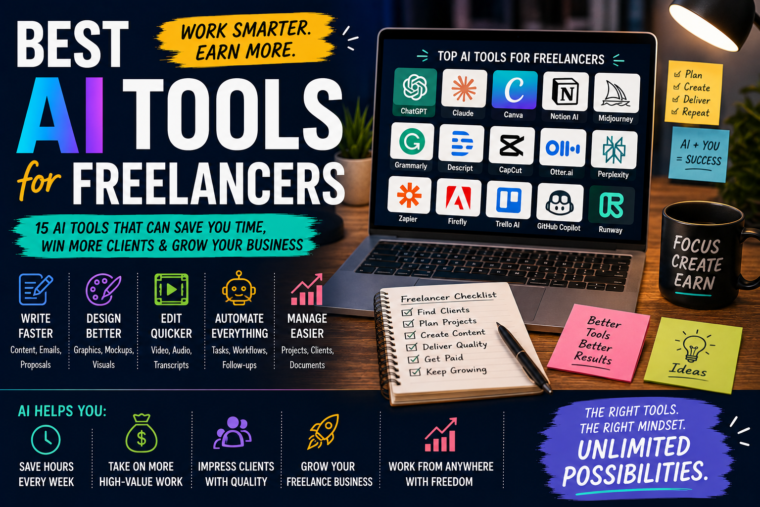
1. ChatGPT – The All-Purpose Assistant
If you’re a freelancer and you’re only going to start with one general-purpose AI assistant, a tool like ChatGPT can cover an enormous number of tasks.
You can use it for:
- Brainstorming
- Research assistance
- Writing
- Editing
- Proposals
- Emails
- Content planning
- Business ideas
- Client communication
- Project planning
- Data analysis
- Creating templates
- Learning new skills
- Organising information
The real advantage isn’t asking it to “write something.”
It’s giving it enough context to become useful.
For example, instead of:
“Write a proposal.”
you could explain:
“I’m a freelance graphic designer pitching to a small restaurant that needs a new visual identity. They currently have an outdated logo and inconsistent social media graphics. Write a concise proposal that focuses on how a consistent visual identity could make their marketing look more professional.”
That’s much closer to how you’d actually work with a virtual assistant.
How Freelancers Can Use ChatGPT
Imagine you’re a freelance writer.
A client sends you a complicated brief.
You could use AI to help break it into:
- Target audience
- Main objective
- Key messages
- Tone
- Deliverables
- Questions you need to ask
You still do the actual creative work.
But you’re no longer staring at a huge block of information wondering where to begin.
Use AI as a Thinking Partner
One of the most useful applications isn’t writing at all.
It’s thinking.
You can give AI a business problem and ask it to challenge your assumptions.
For example:
“I’m thinking about offering social media management to local businesses. What could go wrong with this business model?”
That’s far more useful than asking:
“Give me a business idea.”
Good freelancers don’t just produce things.
They solve problems.
AI can help you think through those problems.
2. Claude – Useful for Long Documents and Detailed Work
Claude can be particularly useful when you’re dealing with substantial amounts of text or information.
Freelancers can use it for:
- Long documents
- Research notes
- Editing
- Content planning
- Proposals
- Client briefs
- Summarising information
- Brainstorming
- Writing assistance
- Analysing lengthy material
Imagine a client gives you a 30-page project brief.
Reading it carefully is still your responsibility.
But an AI assistant can help you organise the information afterwards.
You could ask:
“Break this brief into project objectives, deliverables, deadlines, risks and questions I should clarify with the client.”
That can save considerable time.
3. Google Gemini – Helpful for Freelancers Working in Google’s Ecosystem
If much of your freelance business runs through Google’s productivity tools, an AI assistant integrated into that ecosystem can be useful.
Freelancers often spend their days jumping between:
- Documents
- Emails
- Spreadsheets
- Presentations
- Calendars
- Files
The less friction between those tools, the better.
You might use AI to help with:
- Drafting content
- Brainstorming
- Summarising information
- Analysing data
- Planning
- Research
- Creating documents
The biggest advantage isn’t necessarily that it can perform one magical task.
It’s that AI becomes part of a workflow you’re already using.
4. Canva – AI for Freelance Designers and Content Creators
Canva has become much more than a simple graphic-design platform.
Its AI-powered features can help freelancers create and modify visual content more quickly.
This can be particularly useful for:
- Social media graphics
- Presentations
- Posters
- Flyers
- Thumbnails
- Marketing materials
- Client mockups
- Simple brand assets
- Promotional content
For a freelance social media manager, for example, you might need to create dozens of graphics every month.
AI can help generate ideas, layouts and visual elements.
You then refine them to match the client’s brand.
Don’t Let AI Design Everything
There’s a temptation to click a button and accept whatever appears.
Don’t.
Good design still requires judgement.
You need to understand:
- Typography
- Spacing
- Colour
- Hierarchy
- Branding
- Composition
AI can accelerate design.
It doesn’t automatically make you a designer.
5. Grammarly – An Extra Pair of Eyes for Your Writing
If your freelance work involves writing, editing or communication, tools such as Grammarly can be useful for polishing your work.
Think beyond articles.
Freelancers write constantly:
- Emails
- Proposals
- Website copy
- Client updates
- Social posts
- Reports
- Project descriptions
- Portfolio pages
A small spelling mistake in an informal message isn’t the end of the world.
But mistakes in a client proposal or professional document can make you look less polished.
AI writing assistants can help identify:
- Grammar problems
- Awkward sentences
- Repetition
- Tone issues
- Clarity problems
You should still read the final version yourself.
6. Notion AI – Your Freelance Business Organiser
Freelancing can become chaotic surprisingly quickly.
You have:
- Client information
- Deadlines
- Ideas
- Notes
- Content calendars
- Meeting notes
- Project plans
- To-do lists
Notion can help bring these things together, while its AI features can assist with organising and working with your information.
For example, after a client meeting, you could turn your notes into:
- Action items
- Deadlines
- Questions
- Responsibilities
Instead of leaving a page of messy notes that you’ll never look at again.
7. Perplexity – AI-Assisted Research
Research can eat up a surprising amount of time.
If you’re writing an article, preparing a presentation or researching a client project, an AI search/research tool can help you find and organise information more quickly.
This can be particularly useful when you need to:
- Understand a new topic
- Find sources
- Compare information
- Generate research directions
- Get an overview of a subject
But here’s a rule worth remembering:
AI-assisted research still needs fact-checking.
Never assume that an AI answer is automatically correct simply because it sounds confident.
For important client work, verify information using reliable primary or authoritative sources.
8. Adobe Firefly – AI for Creative Professionals
For freelancers working heavily with images and creative assets, Adobe’s AI tools can be useful additions to an existing design workflow.
Potential applications include:
- Image generation
- Generative editing
- Creative variations
- Background changes
- Concept development
- Image manipulation
This can be particularly useful when a client asks for something very specific.
Instead of spending hours creating every element manually, AI can help you explore concepts quickly.
You then use your professional judgement to turn those concepts into a finished design.
9. Midjourney – Exploring Creative Concepts
For freelancers who work with visual content, Midjourney can be useful for exploring creative directions and generating visual concepts.
Imagine a client says:
“We want our campaign to feel futuristic but still warm and approachable.”
Instead of trying to explain the idea entirely through words, you can explore multiple visual directions.
You might generate:
- Futuristic environments
- Product concepts
- Moodboards
- Character concepts
- Editorial visuals
- Campaign inspiration
The generated image doesn’t necessarily need to become the final client asset.
Sometimes its greatest value is helping you discover what the final design should look like.
10. CapCut – AI-Assisted Video Editing
Video has become one of the most important content formats online.
Unfortunately, video editing can take a lot of time.
Tools such as CapCut can help simplify tasks such as:
- Captions
- Transcription
- Removing unwanted sections
- Short-form editing
- Basic effects
- Background removal
- Repurposing content
This can be especially useful for freelance:
- Video editors
- Social media managers
- Content creators
- Marketing freelancers
- YouTube specialists
Turn One Video Into Multiple Pieces of Content
Here’s a powerful workflow.
A client gives you a 30-minute podcast.
Instead of delivering one video, you could turn it into:
- The full YouTube video
- 5 Shorts
- 5 TikToks
- 5 Instagram Reels
- Quote graphics
- Social posts
AI can help identify interesting sections and speed up the editing process.
Suddenly, you’re not just offering:
“Video editing.”
You’re offering:
“Content repurposing.”
That’s a much more valuable service.
11. Descript – Great for Text-Based Video Editing
Traditional video editing can feel complicated when you’re starting out.
Descript takes a different approach by allowing you to work heavily with the video’s transcript.
This can be useful for:
- Podcasts
- Interviews
- Talking-head videos
- Tutorials
- YouTube content
- Short-form content
If you want to remove a sentence, for example, editing the transcript can make the process feel much more natural.
For freelancers handling large amounts of spoken content, that can be a major time saver.
12. Otter.ai – Turn Meetings Into Useful Notes
Freelancers have meetings.
Lots of them.
And meetings often create another problem:
What did we actually agree to?
Transcription tools can turn conversations into searchable notes.
This can help with:
- Client meetings
- Interviews
- Brainstorming
- Research
- Project discussions
You can then turn those notes into action items and project tasks.
Just remember to respect privacy, consent and any applicable rules when recording or transcribing conversations.
13. Zapier – Connect Your AI Tools Together
This is where things start becoming particularly interesting.
AI is useful.
Automation is useful.
But combining them can be even more powerful.
Zapier can connect different applications and automate repetitive workflows.
For example:
New client form submitted
↓
Information added to your project system
↓
AI helps create a project brief
↓
Task list created
↓
Client receives confirmation
Instead of doing each step manually, the workflow handles much of the repetitive work.
Freelancers Should Look for Repetition
Here’s a simple exercise.
Write down everything you do during a normal week.
Then highlight tasks that:
- Happen repeatedly
- Follow the same process
- Don’t require much creative judgement
- Take longer than they should
Those are your automation opportunities.
14. GitHub Copilot – For Freelance Developers
If you’re a freelance developer, AI coding assistants can help speed up parts of the development process.
They can assist with:
- Code suggestions
- Boilerplate
- Debugging
- Explaining code
- Refactoring
- Documentation
- Generating tests
- Exploring implementation ideas
But developers need to be especially careful about blindly accepting generated code.
AI can produce:
- Bugs
- Security vulnerabilities
- Inefficient solutions
- Incorrect assumptions
Treat generated code as something to review-not something to trust automatically.
15. AI Spreadsheet and Data Tools
Freelancers who work with data don’t necessarily need to spend hours manually manipulating every spreadsheet.
AI-assisted data tools can help with:
- Cleaning data
- Finding patterns
- Creating formulas
- Summarising datasets
- Generating charts
- Analysing trends
- Explaining calculations
This can be useful for freelancers in:
- Marketing
- Finance
- Research
- Business consulting
- Operations
Again, always verify important calculations.
The Best AI Tool Depends on Your Freelance Skill
This is probably the most important part of the list.
There isn’t one universal “best AI tool.”
The best tool depends on what you actually do.
Let’s break it down.
Best AI Tools for Freelance Writers
A writer might benefit most from:
- ChatGPT
- Claude
- Grammarly
- Research-focused AI tools
- Notion AI
A good workflow might look like:
Research → Outline → Draft → Human editing → Fact-check → Final polish
Notice something?
AI isn’t responsible for the entire process.
You’re still the writer.
Best AI Tools for Graphic Designers
A designer might benefit from:
- Canva
- Adobe Firefly
- Midjourney
- ChatGPT
- Image-editing tools
The workflow might be:
Client brief → Ideas → AI concepts → Design → Refinement → Client revisions → Final delivery
AI speeds up exploration.
Your design skills create the final product.
Best AI Tools for Video Editors
Video freelancers might benefit from:
- CapCut
- Descript
- AI transcription tools
- ChatGPT
- Audio enhancement tools
A possible workflow:
Raw footage → Transcription → Rough edit → AI-assisted cleanup → Manual editing → Captions → Final review
Best AI Tools for Social Media Managers
A social media freelancer could combine:
- ChatGPT
- Canva
- CapCut
- Notion
- Automation tools
For example:
Content strategy → Ideas → Captions → Graphics → Videos → Scheduling → Analytics
AI can make every stage faster.
Best AI Tools for Developers
Developers could consider:
- GitHub Copilot
- ChatGPT
- Claude
- AI debugging tools
- AI-assisted documentation tools
The important thing is to maintain control over the codebase.
Best AI Tools for Virtual Assistants
Virtual assistants can use AI for:
- Email drafting
- Meeting summaries
- Research
- Scheduling
- Document creation
- Data organisation
- Customer support
This can turn a general virtual assistant into a much more efficient operator.
The Freelancer’s AI Toolkit Doesn’t Need to Be Huge
You don’t need 30 AI tools.
In fact, I’d recommend starting with perhaps three categories:
One general AI assistant
For thinking, writing and planning.
One creative tool
For design, images or video.
One automation/productivity tool
For repetitive workflows.
That’s enough to start.
Master those before adding anything else.
Don’t Become an AI Tool Collector
This is surprisingly easy.
You see:
“The new AI tool that will change everything!”
You sign up.
Then another one appears.
And another.
Suddenly you’re paying for six subscriptions and barely using any of them.
That’s not productivity.
That’s digital clutter.
Calculate the Return on Your AI Tools
Before paying for an AI subscription, ask:
How often will I use it?
How much time will it save?
Will it help me make more money?
Will it improve my client work?
If a tool costs £20 a month but saves you five hours of work, it may be worthwhile.
If it costs £30 and you use it once every three weeks, probably not.
AI Can Help You Raise Your Freelance Rates
This is where the conversation gets interesting.
Some freelancers worry:
“If AI makes me faster, shouldn’t I charge less?”
Not necessarily.
Imagine you previously needed five hours to complete a project.
After improving your workflow, you can produce the same—or better—result in two hours.
You don’t necessarily need to tell the client:
“I used AI, so here’s a lower price.”
You’re being paid for the result and expertise, not for how slowly you can produce it.
But Don’t Use AI to Fake Expertise
There’s an important boundary.
If a client hires you because you’re an expert, you shouldn’t secretly outsource all the intellectual work to AI and deliver something you don’t understand.
You need to be able to stand behind what you deliver.
If AI gives you an answer, understand it.
If AI writes the code, review it.
If AI creates the design, refine it.
If AI researches the topic, verify it.
Your reputation is worth more than a few minutes saved.
Use AI to Increase Your Capacity
Suppose you can comfortably manage five clients.
With a better workflow, maybe you can handle seven without working twice as many hours.
That’s where AI becomes powerful.
You’re not necessarily working harder.
You’re removing unnecessary friction.
AI Can Also Help You Offer More Services
Imagine you’re a freelance writer.
You might traditionally offer:
Blog writing.
With AI-assisted workflows, you might expand into:
- Blog writing
- SEO content
- Social media posts
- Email newsletters
- Content repurposing
- Content strategy
A graphic designer could expand into:
- Social media graphics
- Advertising creatives
- Thumbnails
- Presentation design
- Brand assets
A video editor could expand into:
- Long-form editing
- Shorts
- Reels
- TikToks
- Podcast clips
- Captions
AI can help you broaden your service offering without having to build every process from scratch.
Create Productised Services
Instead of saying:
“I do social media.”
offer something specific.
For example:
Monthly Social Media Content Package
12 branded graphics
8 short-form videos
20 captions
Content calendar
Monthly performance review
Now the customer knows exactly what they’re buying.
AI can help you deliver the package efficiently.
Create Recurring Revenue
Freelancing becomes much less stressful when you’re not starting from zero every month.
Instead of constantly asking:
“Where will my next client come from?”
you want some clients to continue paying you.
Examples include:
- Monthly content creation
- Weekly video editing
- Ongoing design
- Email marketing
- Social media management
- Website maintenance
- AI automation services
Recurring work creates stability.
AI Can Help With Client Acquisition Too
AI isn’t just useful after you get a client.
It can help before you get one.
For example, you can use AI to brainstorm:
- Outreach ideas
- Proposal structures
- Portfolio descriptions
- LinkedIn content
- Email follow-ups
- Service packages
- Client personas
But don’t send generic AI-written spam.
People can recognise it.
Personalisation matters.
Write Outreach Like a Human
Compare these two messages.
Generic
“Dear Sir/Madam, I am a highly skilled professional offering premium social media solutions to help businesses grow their online presence.”
Nobody wants to read that.
A better approach is:
“I noticed you’ve been posting regularly, but your recent posts use several different visual styles. I put together a quick example of what a more consistent look could look like.”
Specific.
Relevant.
Human.
Use AI to Research Prospects
Before contacting someone, you can use AI to help organise information you’ve gathered about their business.
You might identify:
- Their audience
- Their products
- Their current marketing approach
- Possible weaknesses
- Opportunities for your service
Then write a personalised pitch.
That is much better than sending 100 identical messages.
Build a Personal Brand
AI makes content creation easier.
That means there’s even more content competing for people’s attention.
One way to stand out is to build a personal brand.
Share:
- What you’re learning
- Projects you’ve completed
- Client lessons
- Mistakes
- Case studies
- Opinions
- Tutorials
AI can help you organise these ideas.
But your actual experiences are what make them interesting.
Don’t Let AI Erase Your Personality
This is probably the biggest problem with AI-assisted freelancing.
If everything you publish sounds like:
“In today’s fast-paced digital landscape…”
people will stop paying attention.
Write like a human.
Use short sentences.
Tell stories.
Have opinions.
Admit when something didn’t work.
Use examples.
That’s how you stand out.
AI Should Handle the Boring Parts
Here’s a useful rule:
Automate the repetitive.
Protect the creative.
If you’re doing something 50 times a week and it doesn’t require much judgement, AI or automation might be perfect for it.
If you’re developing a creative concept, making a strategic decision or building a relationship with a client, don’t rush to automate it.
Some things are valuable precisely because they’re human.
A Simple AI Workflow for Almost Any Freelancer
Here’s a workflow that can work across many freelance careers.
Step 1: Capture
Collect the client brief, emails, notes and requirements.
Step 2: Organise
Use AI to summarise and structure the information.
Step 3: Plan
Create tasks, deadlines and milestones.
Step 4: Create
Use AI to brainstorm or accelerate production.
Step 5: Refine
Use your expertise to improve the output.
Step 6: Review
Check everything manually.
Step 7: Deliver
Send the finished work.
Step 8: Repurpose
Turn the project into portfolio content, case studies or social posts.
That last step is often overlooked.
Turn Your Client Work Into Marketing
Suppose you design a website for a client.
The project itself is one piece of work.
But you could also create:
- A case study
- A LinkedIn post
- An Instagram carousel
- A portfolio entry
- A behind-the-scenes video
- A testimonial graphic
One project can generate multiple marketing assets.
AI can help you turn the raw material into those formats.
Use AI to Build Your Portfolio Faster
If you’re new to freelancing, you may have a problem:
“I don’t have any clients, so I don’t have anything to put in my portfolio.”
You can create sample projects.
A writer could create:
- Mock blog posts
- Email campaigns
- Product descriptions
A designer could create:
- Fictional brands
- Social campaigns
- Packaging concepts
A video editor could edit:
- Stock footage
- Public-domain material
- Their own recordings
Be transparent that they’re sample projects.
AI Can Help You Learn Faster
This is another huge benefit for freelancers.
Imagine you’re a graphic designer who wants to learn email marketing.
You can ask an AI assistant to explain:
- Email funnels
- Subject lines
- Conversion rates
- A/B testing
- Segmentation
Then practise.
Or you’re a writer who wants to understand SEO.
AI can help explain:
- Search intent
- Keyword research
- Internal linking
- Content structure
You still need proper learning and real-world practice.
But AI can make the learning process much more interactive.
Don’t Stop Learning the Fundamentals
This deserves its own section.
AI can generate:
- Code
- Text
- Images
- Ideas
- Designs
But if you don’t understand the fundamentals, you’ll struggle to recognise bad output.
A designer who understands composition can spot a weak AI-generated layout.
A writer who understands grammar can spot awkward writing.
A developer who understands programming can spot dangerous code.
A marketer who understands strategy can spot meaningless AI-generated copy.
The better your underlying skill, the more useful AI becomes.
The Future Freelancer Is Probably AI-Assisted
I don’t think AI means freelancers will disappear.
But I do think the nature of freelancing is changing.
A freelancer who knows how to use AI effectively can potentially compete with much larger teams.
One person can research.
Write.
Design.
Edit.
Automate.
Analyse.
Market.
That’s powerful.
But there’s also a downside.
More people can produce content.
More people can offer services.
More people can enter freelance marketplaces.
So simply saying:
“I use AI.”
won’t be enough.
Your Competitive Advantage Is Still You
AI is becoming widely available.
Your:
- Experience
- Taste
- Communication
- Reliability
- Creativity
- Problem-solving
- Industry knowledge
- Relationships
are much harder to copy.
That’s why the best freelancers won’t necessarily be the people who use the most AI tools.
They’ll be the people who know where AI belongs in their workflow and where it doesn’t.
How to Choose Your First Three AI Tools
If you’re feeling overwhelmed by the options, keep it simple.
Choose:
Tool #1: General assistant
Use it for thinking, writing, planning and research support.
Tool #2: Skill-specific tool
Choose one based on your profession.
For example:
- Design
- Video
- Coding
- Writing
Tool #3: Automation/productivity tool
Use it to reduce repetitive administrative work.
Then spend a month learning those tools properly.
Don’t add another ten immediately.
A Practical AI Toolkit by Freelance Career
| Freelance Career | Useful AI Categories |
|---|---|
| Writer | Writing assistant, research, grammar |
| Graphic designer | Image generation, design, editing |
| Video editor | Transcription, editing, captions |
| Social media manager | Writing, design, video, analytics |
| Developer | Coding assistant, debugging |
| Virtual assistant | Writing, transcription, automation |
| Photographer | Image editing, enhancement |
| Marketer | Research, copywriting, analytics |
| Consultant | Research, analysis, presentations |
| Online tutor | Lesson planning, content creation |
| SEO freelancer | Research, content, analysis |
| Web designer | Coding, copywriting, design |
The exact tool matters less than building a workflow around your actual work.
How to Avoid Becoming Dependent on AI
This is something freelancers should think about now rather than later.
If AI disappeared tomorrow, could you still do your job?
If the answer is no, that’s a warning sign.
Use AI to accelerate your skills.
Don’t let it replace your ability to think.
You should still be able to:
- Write
- Research
- Design
- Code
- Analyse
- Communicate
- Make decisions
without an AI assistant doing everything for you.
Protect Your Clients’ Confidential Information
Freelancers often handle sensitive material.
That could include:
- Business plans
- Customer information
- Contracts
- Financial information
- Private documents
- Unreleased products
- Marketing strategies
Before putting client information into an AI service, understand the tool’s privacy and data-handling policies and make sure your client agreement permits the workflow.
When in doubt, remove unnecessary identifying or confidential information.
Trust is one of your most valuable freelance assets.
Don’t Use AI to Cut Corners on Client Work
There is a difference between:
Using AI to work efficiently
and:
Using AI to avoid doing the work.
For example, if a client hires you to write an expert article, don’t simply generate an article and send it without reading it.
If they hire you to build a website, don’t blindly paste AI-generated code into production.
If they hire you to create a brand identity, don’t deliver the first generated logo.
AI should make your process better.
Not make you careless.
How Much Can AI Actually Save a Freelancer?
It depends on the person and the workflow.
Someone who spends hours every week writing repetitive emails might save a significant amount of time with templates and AI assistance.
A video editor could save time through automated transcription and captioning.
A social media manager could speed up content repurposing.
A developer could reduce time spent on boilerplate code.
The important thing isn’t the exact number of hours.
It’s identifying where your time is going.
Do a Freelance Time Audit
For one week, track what you actually do.
At the end of the week, divide your activities into:
High-value work
Things clients pay you for.
Low-value work
Necessary but repetitive tasks.
Waste
Things that don’t contribute much to your business.
Then ask:
Which low-value tasks could AI or automation handle?
That question alone can improve your business.
The Goal Isn’t to Work 24/7
This is worth emphasising.
AI shouldn’t become:
“Now I can do twice as much work!”
It can also mean:
“Now I can finish my work earlier.”
Freelancing is supposed to give you some control over your time.
If AI helps you complete your work more efficiently, you don’t always need to fill the extra time with more clients.
You can use it to:
- Rest
- Learn
- Spend time with family
- Build your own projects
- Exercise
- Travel
- Actually enjoy being self-employed
Productivity isn’t just about making more money.
Sometimes it’s about getting your time back.
Final Thoughts: The Best AI Tool Is the One You Actually Use
It’s easy to become obsessed with finding the “best” AI tool.
But here’s the truth:
The best AI tool is usually the one that solves a real problem in your workflow.
You don’t need every new AI product.
You don’t need dozens of subscriptions.
You don’t need to automate your entire business.
Start small.
Pick one repetitive task.
Find a tool that can make it easier.
Test it.
Improve the workflow.
Then move on to the next problem.
Over time, those small improvements can add up.
A writer can research faster.
A designer can explore more concepts.
A video editor can process footage faster.
A developer can move through repetitive coding tasks more quickly.
A social media manager can create more content.
A virtual assistant can manage more clients.
And that’s where AI becomes genuinely useful for freelancers.
The Bottom Line
AI isn’t a replacement for freelancing.
It’s becoming part of the freelancer’s toolkit.
The people who benefit most won’t necessarily be those who generate the most content or subscribe to the most AI platforms.
They’ll be the people who understand their business well enough to recognise where AI can make a meaningful difference.
Use AI to save time.
Use it to explore ideas.
Use it to automate repetitive work.
Use it to learn.
Use it to increase your capacity.
But keep the human parts of your business human.
Your judgement.
Your creativity.
Your communication.
Your expertise.
Your relationships with clients.
Those are the things that turn a freelancer into someone clients actually want to work with.
And if you can combine those qualities with the right AI tools, you don’t just become a freelancer who happens to use AI.
You become a freelancer who can get more done, deliver better work and build a business around your own skills-with AI working quietly in the background.